 Rental Property Ledger
Every rent payment, lease and expense in one place, sorted for tax time.
Rental Property Ledger is one Excel and Google Sheets workbook for small landlords with 1 to 6 properties. It keeps your rent roll, shows who's paid each month, logs income and expenses, and sorts expenses into Schedule E lines so your year-end summary is ready to hand to your tax preparer.
- Excel + Google Sheets
- No macros
- SAMPLE data included
- One-time $19
Sound familiar?
"Did unit 2 pay this month?"
Rent arrives by app, check and transfer, and partial payments are easy to lose track of.
Lease dates sneak up
A lease ends and you notice when the tenant asks what's next.
The tax-time shoebox
Receipts for repairs, insurance and utilities need sorting into Schedule E lines every spring.
Is this property paying off?
Income and expenses are mixed together, so net per property is a guess.
What's inside
One .xlsx workbook with 8 sheets, plus a printable How-to-Use PDF and a README. SAMPLE rows come pre-filled so you can see how everything works before you add your own data.
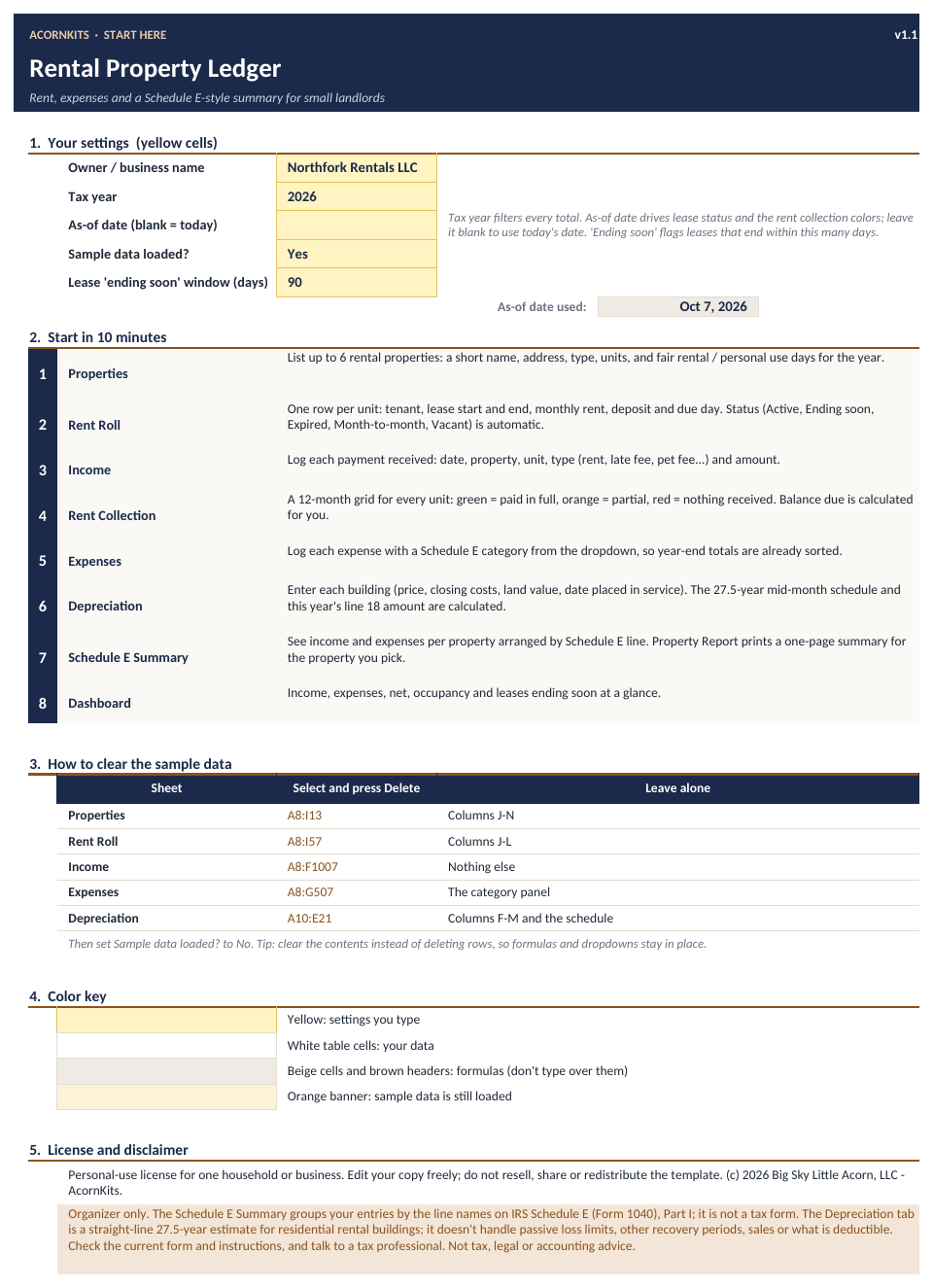
Start Here
Your name, tax year, as-of date and 'ending soon' window, plus a quick start.
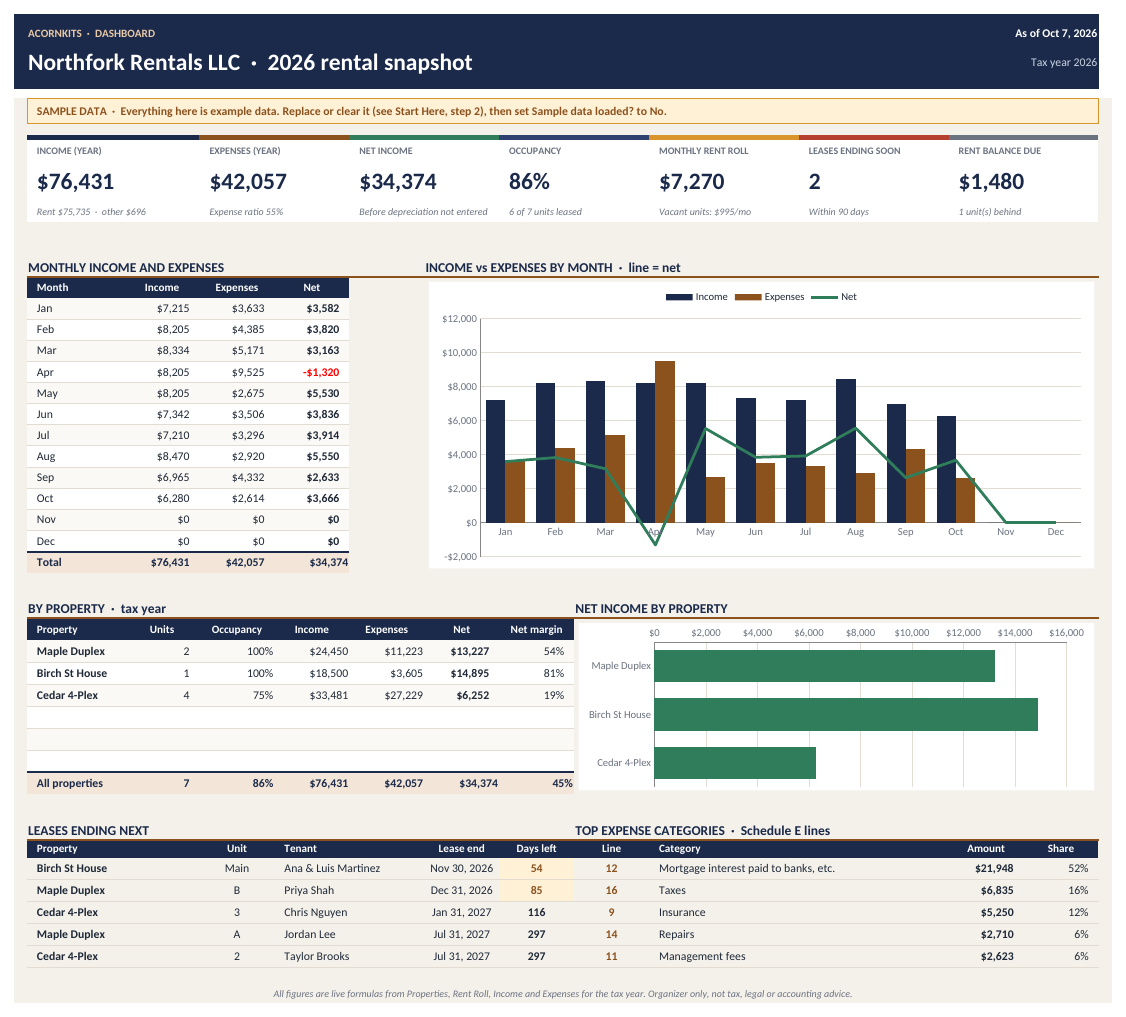
Dashboard
Income, expenses, net, occupancy, monthly rent roll, leases ending soon and rent balance due, with charts.
Properties
Up to 6 properties with yearly income, expenses, net and occupancy.
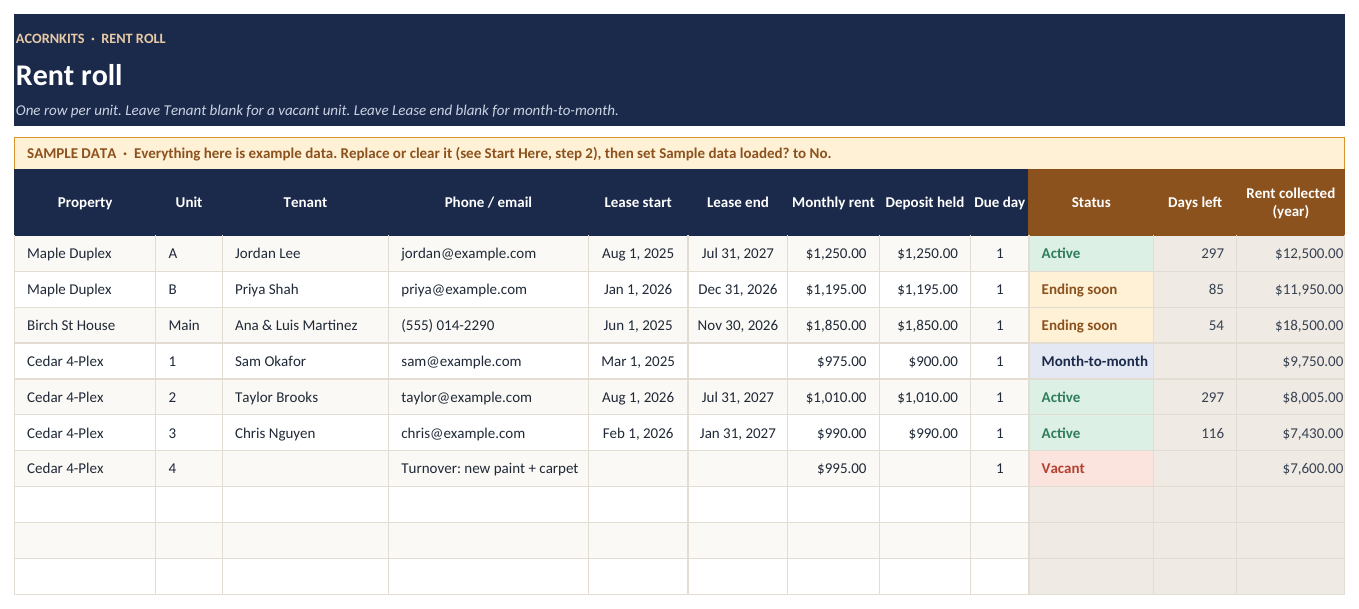
Rent Roll
50 units: tenant, lease dates, rent, deposit and an automatic status (Active, Ending soon, Expired, Month-to-month, Vacant).
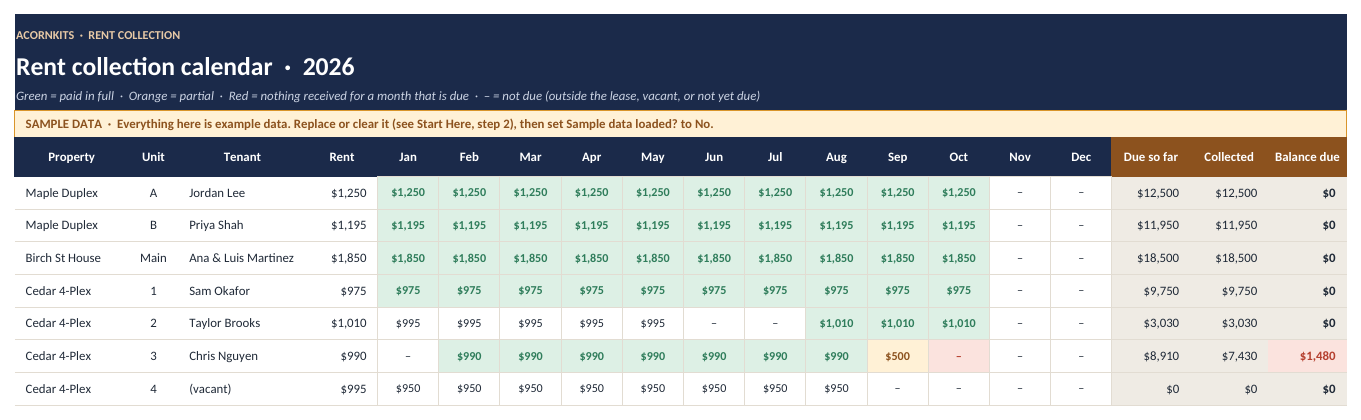
Rent Collection
A 12-month grid showing paid in full, partial or unpaid for every unit, with balance due.
Income
A 1,000-row log for rent, late fees, pet fees, laundry and other income.
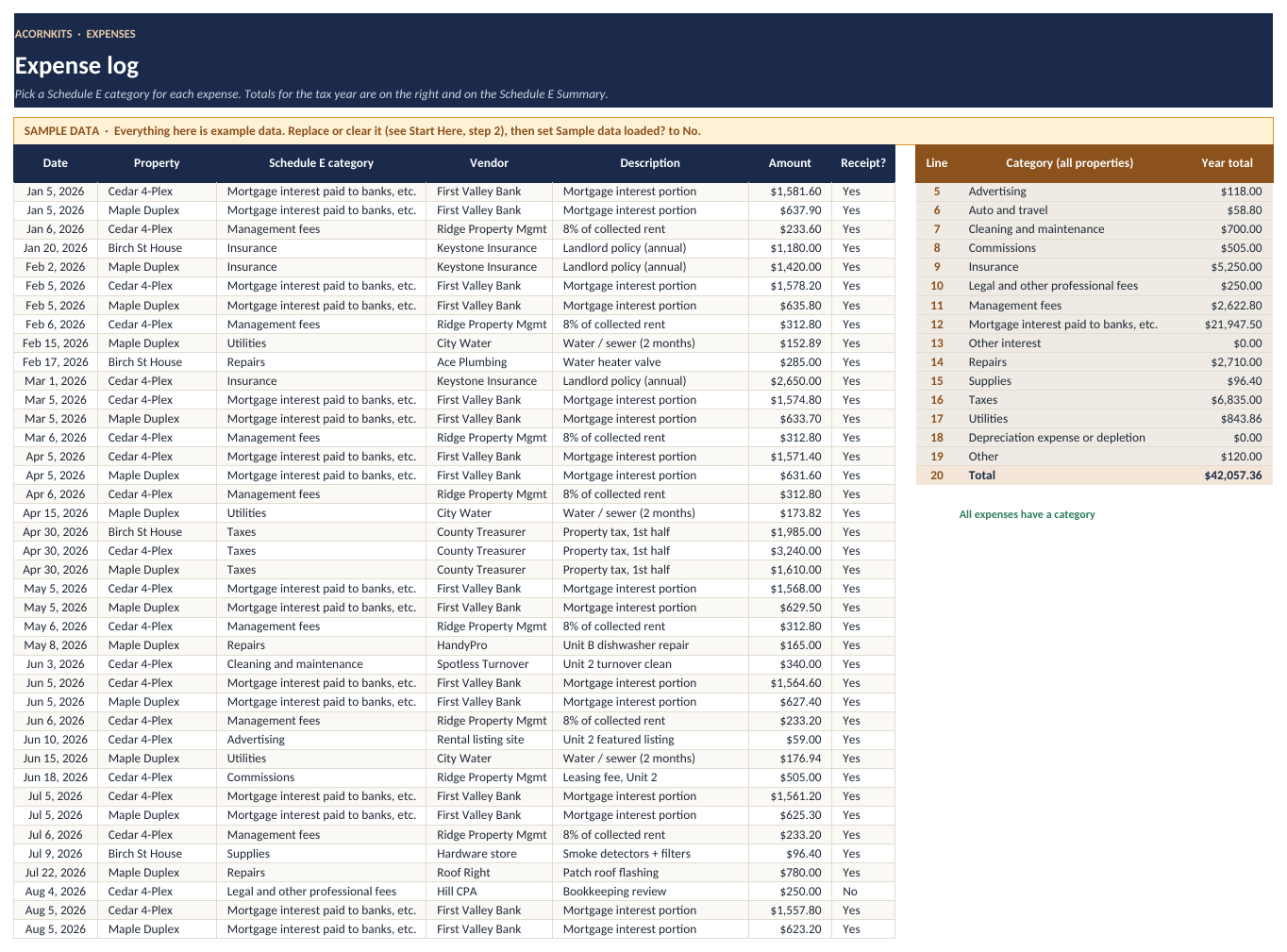
Expenses
A 500-row log with a Schedule E category dropdown (lines 5 to 19).
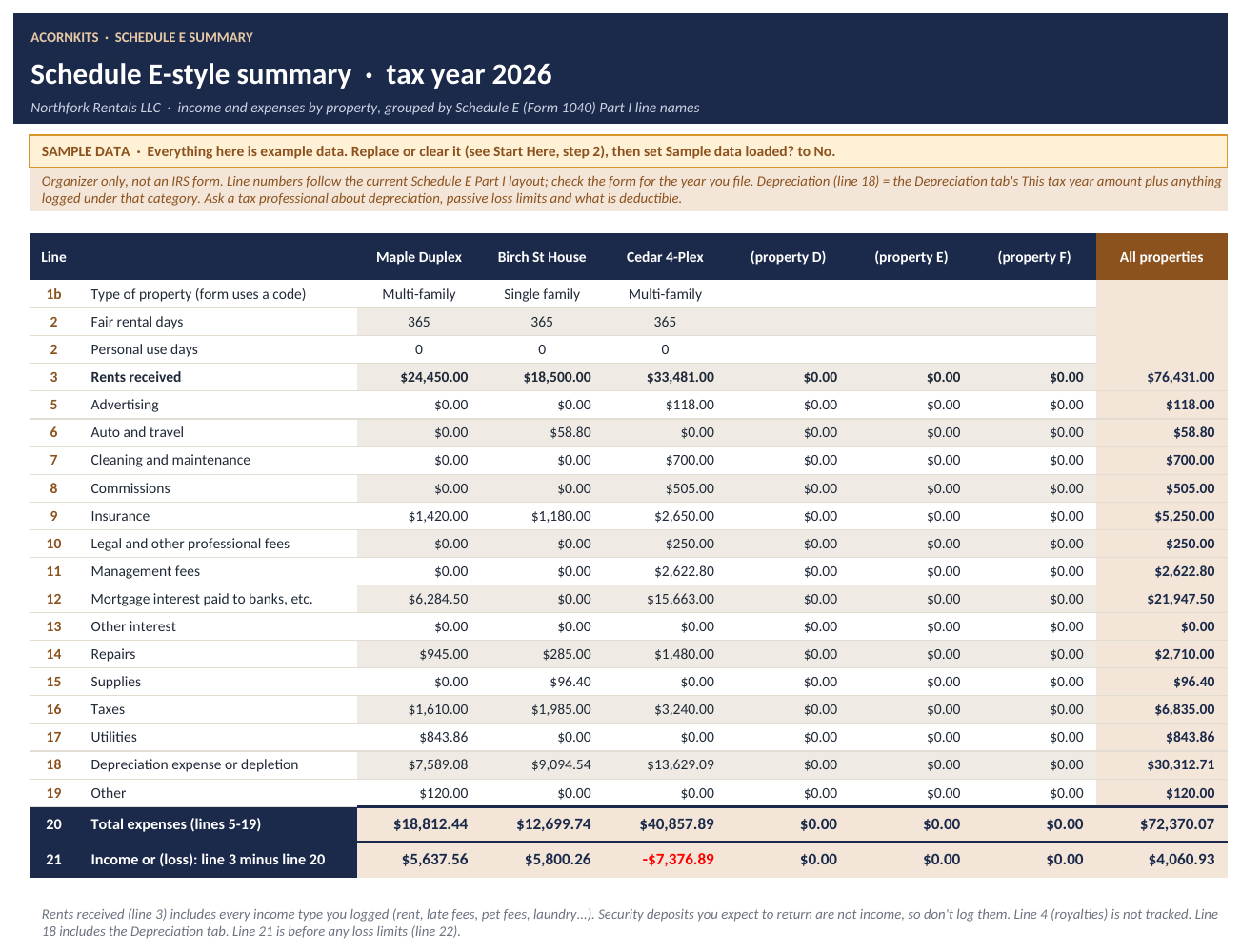
Schedule E Summary
Totals per property by Schedule E line. An organizer, not an IRS form.
See the actual workbook
These are renders of the real file with its SAMPLE data, made in LibreOffice. Fonts and colors look slightly different in Excel and Google Sheets. Tap any image to see it full size.
Is it a good fit?
Good fit for
- Small landlords with 1 to 6 properties (up to 50 units)
- House hackers and part-time landlords who manage their own rentals
- Anyone who wants expenses sorted by Schedule E line before meeting their tax preparer
- People who'd rather use a spreadsheet than property-management software
Not a fit for
- Property managers who need tenant portals, online rent collection or bank sync
- Anyone who needs depreciation, passive-loss or deductibility calculations. It doesn't do those.
- Anyone looking for tax, legal or accounting advice
FAQ
Is the Schedule E Summary an IRS form?
No. It totals your expenses by Schedule E Part I line so they're organized for you or your tax preparer. It doesn't calculate depreciation, passive loss limits or what's deductible. Check the current form and instructions, and talk to a tax professional.
How many properties and units does it hold?
Up to 6 properties and 50 units on the Rent Roll, with 1,000 income rows and 500 expense rows.
Is this tax advice?
No. It's an organizer only, not tax, legal or accounting advice.
Does it work in Excel or Google Sheets?
It works in both. It's a standard .xlsx file built on common formulas, with no VBA. In Excel, just open the file. For Google Sheets, upload it to Google Drive and choose Open with Google Sheets (a free Google account works).
Are there macros?
No. There are no macros, scripts or add-ons, so it opens fine on locked-down work computers and in Google Sheets.
Is there sample data?
Yes. Every sheet comes filled with clearly marked SAMPLE data so you can see how it works. The Start Here tab lists exactly which ranges to clear when you're ready for your own numbers.
How do I get the file?
After you pay, Stripe takes you straight to a download page. The link is also on your Stripe receipt, so you can download the file again later.
What's your refund policy?
If the file won't open or is defective, contact us within 14 days of purchase and we'll refund you. Because it's an instant digital download, we don't offer refunds for change of mind. See the refund policy.
What can I do with it under the license?
It's licensed for personal use by one household or business. You can edit it for your own use, but you can't resell, share or redistribute the template files. See the terms.
Get your rentals organized
8 sheets, SAMPLE data to learn from, works in Excel and Google Sheets.
Rental Property Ledger is an organizer. The Schedule E Summary is not an IRS form and doesn't calculate depreciation or loss limits. It isn't tax, legal or accounting advice.